erwin Data Intelligence Suite (DI Suite) stores the scanned or imported metadata in a hierarchy, System > Environment > Table > Column. Thus, systems, environments, tables, and columns constitute your technical assets. You can view the metadata stored in erwin DI Suite in a similar hierarchy in erwin DI Business User Portal (BUP).
To access metadata, on the menu, expand the Metadata node and click <Technical_Asset>.
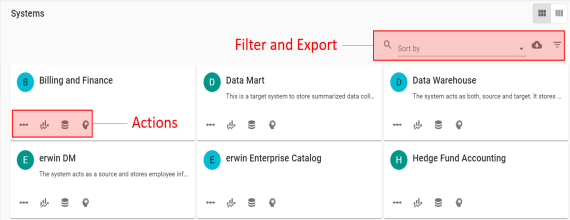
By default, the <Technical_Asset> card view appears.
Note: There is no card view for tables and columns. If you click Tables or Columns then the respective grid appears.
To access the <Technical_Asset> in grid view, click  .
.
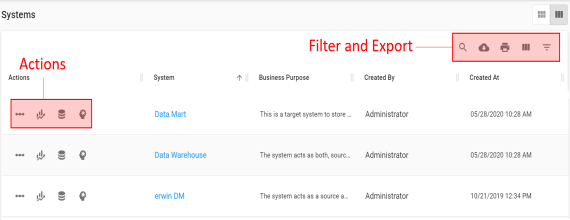
Refer to the following table for descriptions of options under the Actions section.
|
Options |
Description |
|---|---|
|
|
Use this option to view lineage of a technical asset. |
|
|
Use this option to view impact analysis of a technical asset. |
|
|
Use this option to view environments under a system. This option is available only for Systems. |
|
|
Use this option to view mind map of a technical asset. |
|
|
Use this option to view tables under an environment. This option is available only for Environments. |
|
|
Use this option to view mappings of a technical asset. This option is available only for Columns and Tables. |
|
|
Use this option to view columns under a table. This option is available only for Tables. |
|
|
Use this option to view valid values of a column. This option is available only for Columns. |


Refer to the following table for descriptions of options under the Filter and Export section.
|
Options |
Description |
|---|---|
|
|
Use this option to search the required assets. |
|
Sort by |
Use this option to sort assets in alphabetical or reverse alphabetical order. This option is available only in the card view. |
|
|
Use this option to download a list of assets in the XLSX format. |
|
|
Use this option to filter assets based on the available options. |
|
|
Use this option to print a list of assets. |
|
|
Use this option to select columns that you want to show in a grid. By default, all the columns are selected. |


You can analyze metadata details by further drilling down the following technical assets:
|
Copyright © 2020 erwin, Inc.
All rights reserved.
|
|