This topic walks you through the new features and enhancements in the following releases of erwin Mart Portal.
- Major Release
- Patch Release
15.0
erwin Mart Portal 15.0 has the following new features and enhancements:
New Features
The feature introduced in this release is:
Enhancements
The enhancements implemented in this release are:
New Features
The following sections walk you through a brief description of the new feature and wherever relevant, a reference to more information.
DM Connect for DI
-
Logical names-Business terms mapping: You can now map logical names to business terms in the Business Glossary Manager via the DM Connect for DI module.
For more information, refer to the Adding Export Logical Names Jobs topic.
-
The DM Connect for DI feature has been upgraded to support erwin DI v15.0.
Productivity and UI Enhancements
The following sections walk you through a brief description of the enhancements and wherever relevant, a reference to more information.
- erwin Mart Portal database configuration: You can now connect to SQL Server and Azure SQL database via Microsoft Entra authentication. Thus, using identities managed within Microsoft Entra ID, instead of traditional SQL Server login and passwords.
- erwin Mart PortalAdvanced configuration: The Advanced settings have been updated.
- Following options have been added to the Advanced settings of configuration:
Update Mart Portal Path
Update ER360 Path
These options reset the root path for each catalog in Mart Portal and ER360, respectively. Correct paths are essential for permissions to work. Use these options on installation, upgrading, or when permissions do not apply as expected.
- The Is GitHub Enterprise option has been removed from the UI, its behavior is now determined by the system based on the domain type selected during source control repository configuration.
- Following options have been added to the Advanced settings of configuration:
For more information, refer to the Configuring erwin Mart Portal topic.
Third Party Tools
Support for third-party tools has been upgraded as follows:
-
Apache Server has been updated to v2.4.63.
-
JDK has been updated to 21.0.7.
15.1
erwin Mart Portal 15.1 has the following new features and enhancements:
New Features
The feature introduced in this release is:
Enhancements
The enhancements implemented in this release are:
New Features
The following sections walk you through a brief description of the new feature and wherever relevant, a reference to more information.
DM Connect for DI-Syncing Business Glossary
DM Connect for DI feature enables you to sync business glossaries from erwin DM models to erwin Data Intelligence (DI), and harvest them back into the Enterprise Glossary in erwin Mart Portal to maintain a centralized and consistent glossary. This feature works on erwin DM and erwin DI 15.1. For more information, refer to the Scenario Syncing Business Glossary topic.
Productivity and UI Enhancements
erwin Mart Portal 15.1 has the following enhancements:
-
erwin Mart Portal Settings configuration: The Settings module now includes a new DM AI Credentials field under the General tab. This field is used to enable AI-powered features in erwin DM. For more information, refer to the General Settings topic.
-
The label Azure AD has been renamed to Entra ID to reflect the updated branding.
15.2
erwin Mart Portal 15.2 has the following new enhancements:
Enterprise Glossary
Several enhancements have been implemented for Enterprise Glossary:
-
Dashboard for Glossary View: Enterprise Glossary now has a dashboard that displays insights on usage trends and key performance indicators. This dashboard is available at the Glossary View node. It shows metrics such as the Total Glossaries, Glossaries with Most Associations, and Glossary Monthly Stats.
-
Toolbar with erwin AI and Formatting Features: You have a new toolbar that includes text formatting options and erwin AI for generating and updating business term descriptions and definitions.
To enable the erwin AI feature, configure your license with AI credentials in the erwin Mart Portal. For more information, refer to the AI-Powered Data Modeling topic.
-
New Custom Properties Fields: You can now add custom properties to business terms. Two new fields are available for this:
-
Property Name
-
Property Value
-
-
Semantic Mapping using AI: The Automap feature now supports AI-powered semantic mapping in addition to existing name-based matching. This update improves mapping precision and reduces manual effort.
For more information, refer to the Enterprise Glossary section.
Real-Time Library and Model Deletion Update
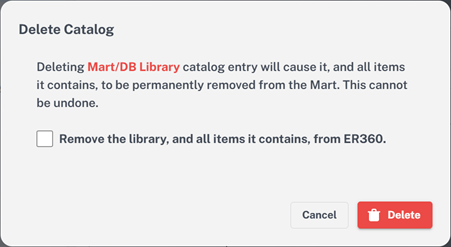
Catalog deletion for harvested models can now be synchronized across erwin Mart Portal and erwin ER360. When a harvested library with models is selected for deletion, the following Delete Catalog dialog box appears with the clear mention of the catalog name along with a checkbox to confirm if the deletion in erwin Mart Portal must be reflected in erwin ER360 provided erwin ER360 is initialized.
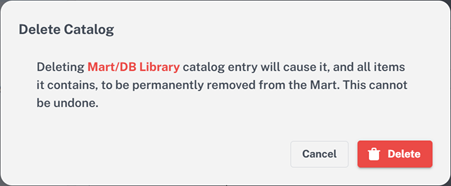
When a non-harvested library and/or model is selected for deletion in erwin Mart Portal, the following Delete Catalog dialog box appears with the clear mention of the catalog name.
For more information, refer to the Deleting Library section in the Catalog Manager topic.
Third Party Tools
Support for third-party tools has been upgraded as follows:
-
Apache Server has been updated to v2.4.65.