Several additions and enhancements have been implemented to improve erwin Data Modeler's productivity and usage experience. These enhancements are:
JSON Field Editor Property
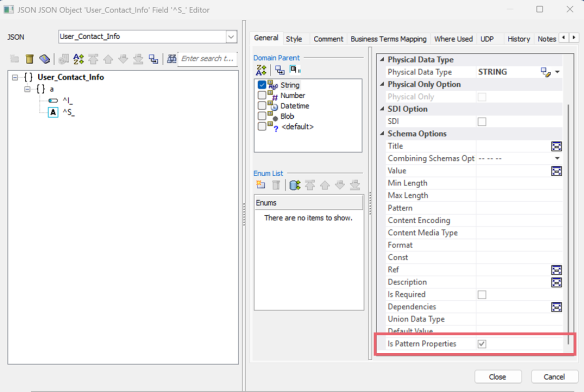
The Pattern Properties option has been removed from the JSON Object Editor and added to the Field Editor as the Is Pattern Properties checkbox. When selected, this specifies that the field contains pattern properties that define a regular expression and schema for validating additional properties.

You can use this option to define regular expression rules that validate data before processing.
ER Diagram Property
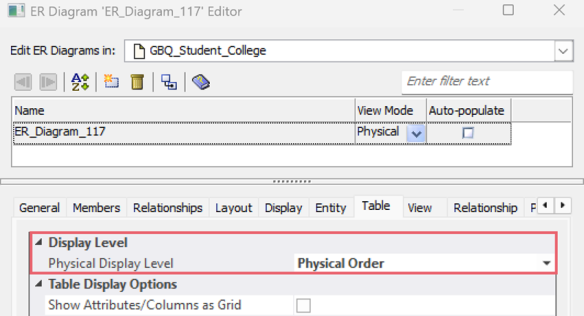
In the ER Diagram Editor, the Physical Order option under Physical Display Level is now available only for SQL databases and Google BigQuery. It is no longer available for other NoSQL databases.
PostgreSQL Permission Editor
The PostgreSQL Permission Editor now includes new options such as Sort Items, Select All, Select None, and Toggle Selection, along with the All and All Except checkboxes.
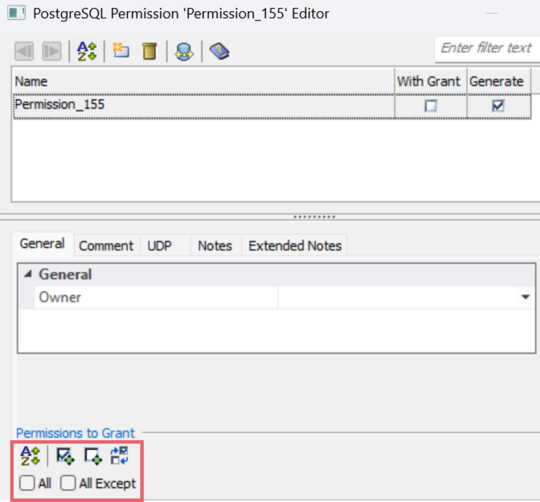
Using these options, you can perform the following actions:
-
Sort Items (
 ): Sort the permission list in alphabetical or reverse alphabetical order.
 -
Select All (
 ): Select all available permissions together.
 -
Select None (
 ): Deselect all selected permissions.
 -
Toggle Selection (
 ): Reverse the current selection state of each permission.
 -
All: Select this checkbox to grant all available permissions.
-
All Except: Select this checkbox to grant all permissions except those currently selected.