This Feature Tour guide walks Data Architects, Data Administrators, Application Administrators, Database Administrators, and Partners through the enhancements in erwin Data Modeler (erwin DM) 15.2 release.
The enhancements in this release are:
Database Support Updates
Support for the following databases has been updated:
|
Database |
Enhancements |
|---|---|
| PostgreSQL |
The Views and Materialized View tabs are now available in the PostgreSQL Reverse Engineering Wizard. For more information, refer to the Reverse Engineering Parameters topic. |
AI-Powered Model Creation
You can use AI to create starter-level data models using simple natural language prompts. This enables you to generate foundational models and then refine or expand them to meet specific requirements.
To create models using AI, follow these steps:
-
In erwin DM, connect to erwin Mart Portal.
-
Click File > New.
The New Model screen appears.
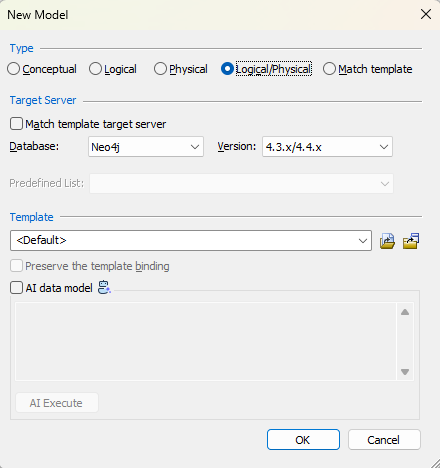
The Conceptual model and AI data model features are available starting erwin DM 15.2.
-
Click Logical, Physical, or Logical/Physical based on the model type that you want to create.
-
In the Database list, select the database, and then in the Version list, select the appropriate version.
-
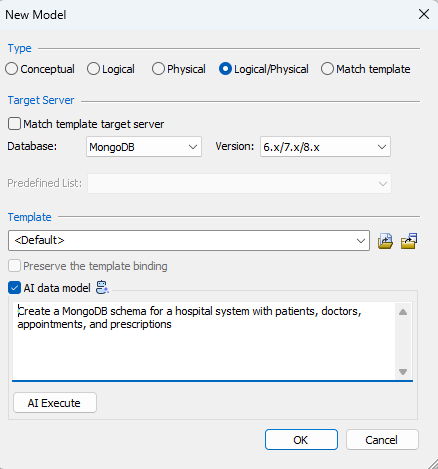
Select the AI data model checkbox.
Clicking this option enables the prompt box.
-
Enter your model description in the AI prompt box.
For example, Create a MongoDB schema for a hospital system with patients, doctors, appointments, and prescriptions.
-
Click AI Execute.
Based on your prompt, a script is generated. You can review, edit, save, and reuse this script. Or you can also cancel the script and modify your prompt.

-
Click OK.
-
Then, click OK.
A logical/physical model is created based on the generated script. The model has four collections, appointments, doctors, patients, and prescriptions according to the prompt.
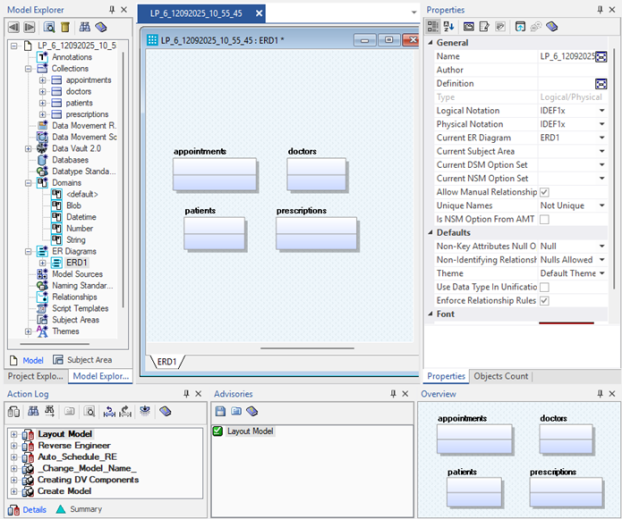
You can use this model as a base and build it further.