Using Reference Data Manager
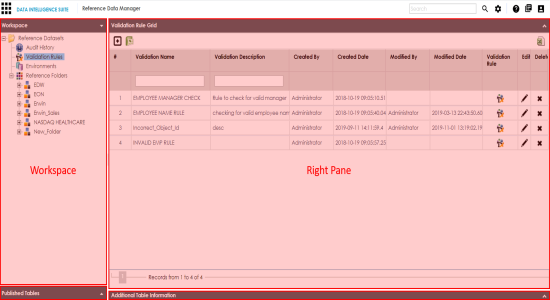
To access the Reference Data Manager, go to Application Menu > Data Catalog > Reference Data Manager. The Reference Data Manager dashboard appears:
|
UI Section |
Function |
|---|---|
|
Workspace |
Use this pane to browse and work on validation rules, environments, reference folders, and reference tables. |
|
Published Tables |
Expand this pane and browse through it to view and export published reference tables. |
|
Right Pane |
Use this pane to work on the data based on your selection in the Workspace pane. |
|
Additional Table Information |
Expand this pane to view or work on additional information of a reference table selected under the Workspace pane. |
- Adding reference data to reference tables
- Assigning users
- Validating reference tables
- Associating codesets with reference tables
- Creating publish environments
- Publishing and versioning reference tables
- Associating reference tables with mappings
|
Copyright © 2020 erwin, Inc.
All rights reserved.
|
|