After creating a validation rule, you need to associate the validation rule with a reference table.
This allows you to execute the validation rule to validate data in the reference table.
To associate validation rules with reference tables, follow these steps:
- Go to Application Menu > Data Catalog > Reference Data Manager.
- Under the Workspace pane, expand the desired reference folder.
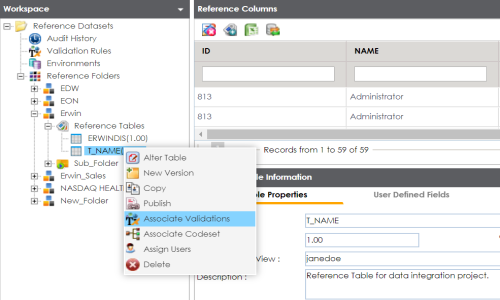
- Expand the Reference Tables node, right-click the desired table, and click Associate Validations.
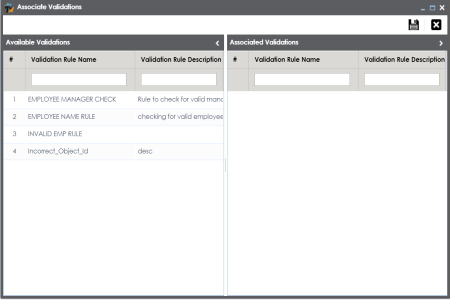
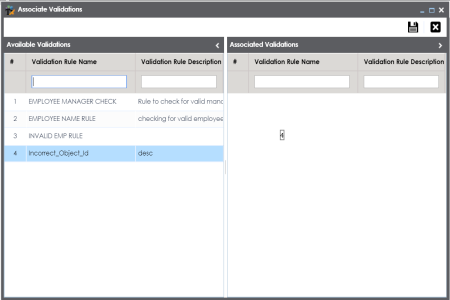
- Drag and drop the validation rule from Available Validation tab to Associated Validation tab.
- Click
 .
.
The Associate Validation page appears.
For more information on adding validation rules, refer to the Adding Validation Rules topic.
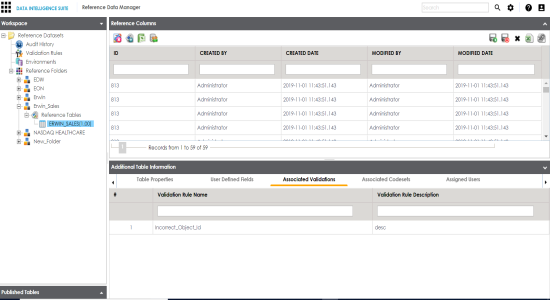
The associated validation rules appear under the Associated Validations tab.
|
Copyright © 2020 erwin, Inc.
All rights reserved.
|
|