You need to assign users to a reference folder before assigning them to reference tables under it.
To assign users to reference folders, follow these steps:
- Go to Application Menu > Data Catalog > Reference Data Manager.
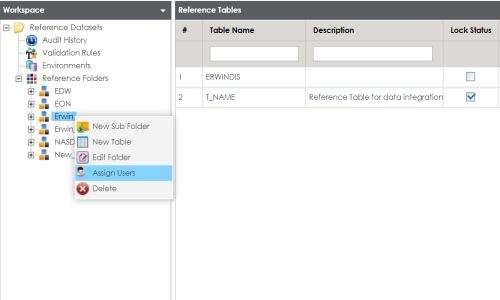
- Under the Workspace pane, right-click the reference folder to be assigned.
- Click Assign Users.
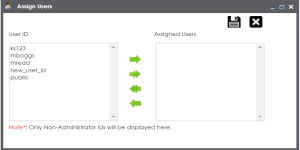
- Use (
 or
or  ) to move users from User ID list-box to Assigned Users list-box and use (
 or
or  ) to move users from Assigned Users list-box to User ID list-box.
 - Click
 .
.
The Assign Users page appears. For more information on creating users and assigning roles, refer to the creating users and assigning roles topic.
Users are assigned to the reference folder.
Note: Assigning users to a reference folder enables you to assign them to the reference tables under it.
|
Copyright © 2020 erwin, Inc.
All rights reserved.
|
|