Managing specifications involves:
- Previewing specifications
- Sharing Link of Specifications
- Copying Specifications
- Editing Specifications
- Deleting Specifications
To manage specifications, follow these steps:
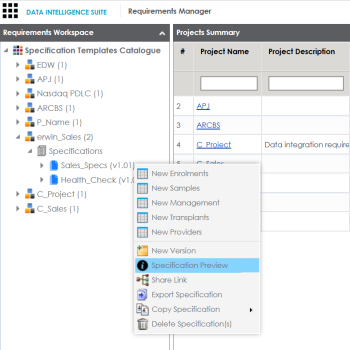
- Right-click a specification to view specification management options.
- Use the following options:
- Specification Preview
- Use this option to preview the specification.
- Share Link
- Use this option to obtain URL of the specification. You can copy the URL or send the URL through an email using MS Outlook.
- Export Specification
- Use this option to download the specification in .xml format.
- Copy Specification
- Use this option to copy specifications.
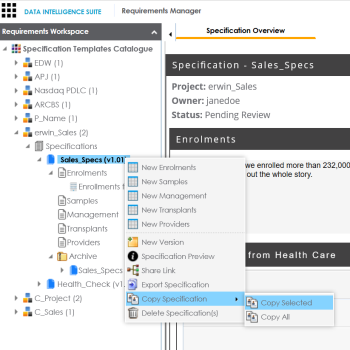
- Copy Selected: To copy specifications, select the specification, right-click the specification and click Copy Selected.
- Copy All: This option enables you to copy the archived specifications too.
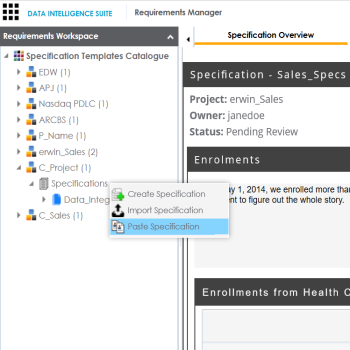
- After copying specification you can paste the specifications in a project.
- Delete Specification
- Use this option to delete specifications. You can also delete all the versions of the specification using this option.
To edit specifications, follow these steps:
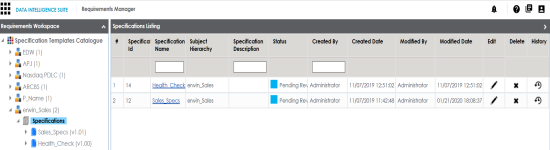
- Click the Specifications node.
- Click
 .
. - Update the fields and click
 .
.
The Specification Listing page appears.
The Specification Details page appears in editable mode.
The specification is updated.
|
Copyright © 2020 erwin, Inc.
All rights reserved.
|
|