QuestAI is an AI-powered module that enables you to interact with data governance and discovery capabilities through a conversational interface. You can ask questions in natural language and quickly access insights across data assets, lineage, glossary, ownership, and governance information. Instead of navigating multiple modules or relying on manual processes, you can retrieve contextual, accurate responses directly through AI assistants.
QuestAI is designed for a wide range of personas, including business analysts, data stewards, compliance teams, and product stakeholders, regardless of technical expertise. It supports both exploratory and task-driven workflows, making data more accessible across the organization.
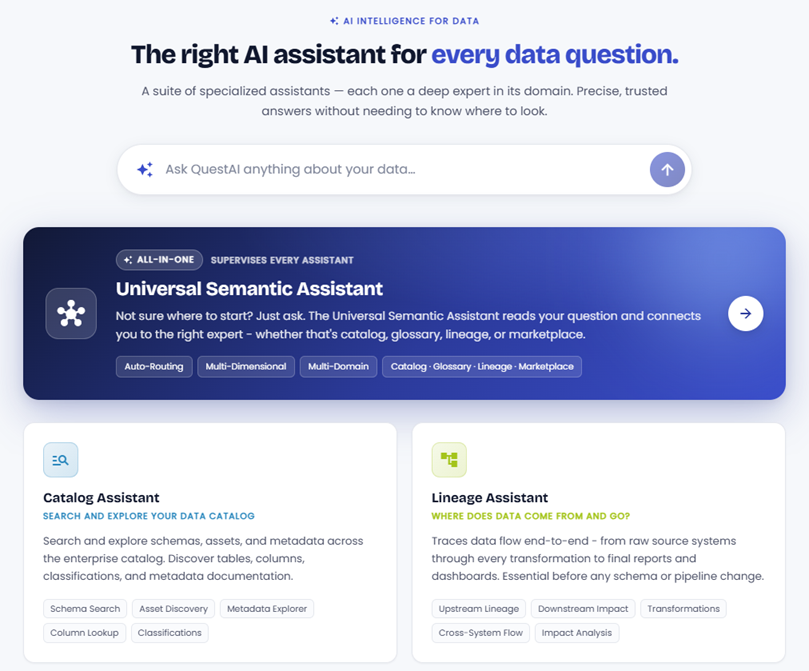
The primary differentiator of QuestAI is its Universal Semantic Assistant, a powerful semantic AI layer that connects across the enterprise data ecosystem. It enables you to:
-
Ask questions across catalog, lineage, glossary, ownership, and compliance from a single interface.
-
Receive context-aware, trusted answers grounded in enterprise metadata.
-
Eliminate delays associated with manual searches and cross-team dependencies.
The result is a more intuitive, self-service experience that improves understanding, accelerates access to insights, and drives confident data usage.
The top five challenges that QuestAI addresses are:
-
Fragmented Access to Data Information
-
Dependence on Data Teams
-
Slow Data Discovery and Understanding
-
Inconsistent Data Interpretation.
-
Manual and Repetitive Governance Effort
In short, it removes friction in accessing, understanding, and governing data by enabling fast, self-served, and consistent intelligence through conversational AI.
Architecture
QuestAI is built on a two-tier architecture - a Universal Semantic Assistant at the top, and five Specialist Assistants beneath it.
The following table guides you on which assistant to use in which scenarios:
|
If your question is about |
Use this assistant |
|---|---|
|
A question that crosses multiple topics at once |
Universal Semantic Assistant |
|
You are not sure which assistant to use |
Universal Semantic Assistant |
|
Finding or exploring a dataset, table, or column |
Catalog Assistant |
|
Where data comes from or what will break if it changes |
Lineage Assistant |
|
What a business term means or who defined it |
Glossary & Ownership Assistant |
|
Who owns a dataset or who to contact about an issue |
Glossary & Ownership Assistant |
|
Which data product to use for your analysis |
Data Marketplace Assistant |
|
Trust scores, SLAs, or requesting access to data |
Data Marketplace Assistant |
|
Generating definitions, tags, or classifications for assets |
Stewardship Assistant |
For step-by-step information on using QuestAI, refer to the Using QuestAI topic.
Tier I-Universal Semantic Assistant
 Ask anything across all data domains
The Universal Semantic Assistant is the most powerful and inclusive assistant in the hub. It is your starting point if you are unsure which specialist to use, or if your question naturally spans multiple data topics at once. It has complete knowledge across all six specialist domains (lineage, glossary, catalog, marketplace, stewardship, and ownership) and can synthesize answers that cross domain boundaries in a single response. It reads your question, understands your intent, and either answers directly across all domains or routes your question to the most relevant specialist assistant behind the scenes.
Think of it as your senior data consultant. It knows everything across the platform and gives you a synthesized, complete answer without making you switch between tools.
Use the Universal Semantic Assistant when:
-
You are unsure which specialist applies to your question.
-
Your question spans multiple topics at once.
For example, you want to know where data comes from and who owns it and whether it is trustworthy. -
You are an executive or business user who wants a complete picture without needing to navigate between different tools.
-
You are new to Quest DI and want to explore what the platform knows.
The following table shows examples of questions and how the universal assistant processes them:
|
Example Question |
What the Assistant Does |
|---|---|
|
Give me a complete picture of the Customer dataset |
Synthesizes definition, lineage, trust score, ownership, and relationships into one response |
|
Is the Churn Rate metric dependable, well-defined, and owned by someone? |
Checks quality scores, glossary approval status, and ownership registry simultaneously |
|
Our CFO is asking why Net Revenue differs between the Finance Dashboard and the Sales Report |
Compares term definitions, traces lineage paths for both reports, and surfaces any quality discrepancies |
|
We are onboarding a new regional sales team. What data is available to them, how trusted is it, and are there compliance restrictions? |
Combines data product discovery, quality certification, and compliance classification in one answer |
|
What does 'Active Customer' mean and where does that data come from? |
Resolves the glossary definition and traces the upstream lineage of the metric in a single response |
|
Which datasets in the Finance domain have quality issues, regulatory risk, and no assigned owner? |
Cross-references quality, compliance, and ownership registries simultaneously |
Tier II-Specialist Assistants
Ask focused queries across specialist domains
Each Specialist Assistant is a deep expert in one specific area of data intelligence. Use these when you already know the type of answer you need. Clicking the tile opens a dedicated conversation window for that assistant.
|
Assistant |
Best Used For |
|---|---|
|
Searching and exploring datasets, schemas, columns, and metadata across the enterprise catalog |
|
|
Tracing where data comes from, where it goes, and what breaks if something changes |
|
|
Looking up business term definitions, comparing terms, and finding who is responsible for a business asset |
|
|
Discovering certified data products, checking trust scores, and comparing data products and datasets |
|
|
AI-powered stewardship tasks, such as generating definitions, classifications, and tags for data assets (technical and business) You can also refer to the Using erwinAI Assistant topic. |
Catalog Assistant
The Catalog Assistant helps you search and explore the enterprise data catalog. Ask it to find datasets, schemas, columns, classifications, and metadata documentation — all without navigating complex catalog interfaces.
|
Example Question |
What the Assistant Does |
|---|---|
|
"Show me all tables in the Finance schema that contain a revenue column" |
Searches the catalog for matching assets and returns schema, table, and column details |
|
"What metadata is documented for the Customer Master table?" |
Returns available documentation, descriptions, classifications, and tags for the asset |
|
" Find all PII columns in my Enterprise Data Warehouse" |
Filters the catalog by classification tag and returns a list of matching columns with their parent tables |
|
"What datasets are available in the Marketing domain?" |
Lists all catalogued assets within the specified domain with their descriptions and status |
|
"Is there a column called transaction_date in our data warehouse?" |
Performs a column-level search across all schemas and returns matches with their context |
Lineage Assistant
The Lineage Assistant traces the complete journey of data across your organization from raw source systems through every transformation to final reports and dashboards. It is the first assistant to use before making any changes to a dataset, column, or pipeline.
|
Example Question |
What the Assistant Does |
|---|---|
|
"Show me the downstream lineage for the Revenue column" |
Maps every table, transformation, and report that the Revenue column flows into |
|
"If we change the Orders table schema, what will break?" |
Performs a full downstream impact analysis and lists affected reports and pipelines |
|
"Where does the Gross Margin figure on my dashboard come from?" |
Traces upstream lineage back to the source systems that feed the metric |
|
"Are there any broken lineage links in the Finance reporting pipeline?" |
Scans the lineage graph for gaps, broken references, or unmapped transformations |
|
"How many systems does Customer Lifetime Value pass through before it reaches the board report?" |
Counts transformation hops and lists each step in the data journey |
Glossary and Ownership Assistant
The Glossary & Ownership Assistant is a combined specialist that handles both business term definitions and data accountability. Ask it anything about what a term means, whether definitions conflict across teams, and who owns or stewards a given dataset.
|
Example Question |
What the Assistant Does |
|---|---|
|
"What is the difference between 'Bookings' and 'Committed Revenue'?" |
Pulls both definitions from the approved glossary and highlights the difference |
|
"Which definition of 'Active Customer' is officially approved?" |
Returns the canonical, approved definition and surfaces any conflicting versions |
|
"Who owns the Customer Master dataset?" |
Returns the data owner, steward, and custodian with their contact details and roles |
|
"Which Finance domain terms are still in draft and not yet approved?" |
Filters the glossary by domain and governance status |
|
"Show me all terms related to Revenue across our business domains" |
Maps a network of related, synonym, and parent/child terms |
|
"Who do I contact if there is an issue with the Gross Margin column?" |
Returns the full escalation path, steward, owner, and technical custodian |
Data Marketplace Assistant
The Data Marketplace Assistant guides users to the right certified data product for their business need. Instead of browsing a complex catalog, describe what you are trying to do, and the assistant recommends the best available data product, explains its SLA and freshness, and walks you through how to access it.
|
Example Question |
What the Assistant Does |
|---|---|
|
"What certified data products are available for sales performance analysis?" |
Lists relevant certified products with their SLAs, refresh schedules, and access details |
|
"I need regional revenue data for a board presentation — what should I use?" |
Recommends the best-fit certified product and flags any uncertified alternatives to avoid |
|
"What is the trust score for the Customer 360 data product?" |
Returns the current quality certification, score, and any open issues |
|
"How do I request access to the Financial Reporting data product?" |
Walks through the access request process step by step |
|
"What is the difference between Customer Insights and Customer Behaviour data products?" |
Compares both products side by side on coverage, freshness, and certification status |
Stewardship Assistant
The Stewardship Assistant accelerates data governance work by using AI to generate definitions, descriptions, classifications, and tags for data assets. Thus, cutting the manual effort of stewardship so teams can focus on decisions that matter rather than documentation tasks.
|
Example Question |
What the Assistant Does |
|---|---|
|
"Generate a business definition for the customer_lifetime_value column" |
Produces a draft definition based on column context, lineage, and glossary patterns |
|
"Auto-classify all untagged columns in the Transactions table" |
Analyses column names, data types, and context to suggest classification tags |
|
"Write a description for the Orders schema based on its contents" |
Generates documentation based on the schema's tables, columns, and relationships |
|
"Which assets in the Finance domain are missing definitions?" |
Scans the catalog and returns a list of assets with no description or business term mapped |
|
"Suggest tags for the new Customer Segments table we just added" |
Recommends relevant classification tags based on column content and domain context |
Best Practices
To get the best possible responses from QuestAI assistants, follow these tips:
-
Be specific about the asset.
The more specific you are about the dataset, column, report, or metric you are asking about, the more precise the answer will be. Instead of "tell me about revenue", try "tell me about the Net Revenue column in the Finance Reporting data product".
-
Use business language freely.
You do not need to know technical database terms. The assistants understand how your business speaks. "Where does our monthly churn number come from?" is a perfectly valid question.
-
Ask follow-up questions.
Conversations are contextual. Once you have an initial answer, you can dig deeper without repeating context. The assistant remembers what you were just discussing.
-
Start broad, then narrow.
If you are exploring a new area, start with a broad question to understand what is available, then narrow down with follow-ups. For example, start with "what data products exist for Finance?" then follow up with "which of those are certified for board reporting?"
-
If you are unsure, use the Universal Semantic Assistant.
There is no penalty for starting with the Universal Semantic Assistant. It will identify the right domain for your question and give you a complete answer or point you to the right specialist if a deeper single-domain answer is needed.
Every answer from a specialist assistant is grounded in your actual Quest DI metadata (your real lineage graphs, your approved glossary, your registered data owners, your quality scores). These are not generic AI responses. They are answers about your organization's data.