To provide data quality capabilities, Quest Data Intelligence (Quest DI) integrates Quest Data Quality as data quality analysis partner. Quest Data Quality profiles your metadata to provide in-depth analysis of your environments, tables, columns, and views. This integration enables you to derive data quality parameters in the Quest DI's Metadata Manager.
This topic walks you through how Quest Data Quality integrates with Quest DI and profiles data to deliver data quality analysis. To get a better understanding on how Quest Data Quality profiles data, refer to the Getting Started topic in the Quest Data Quality user guide.
The data quality analysis for an environment includes the following parameter:
- DQ Score: Displays the profiled data quality score by analyzing the quality of the data across environments, tables, columns, and views in your metadata.
For more information on other data quality parameters, refer to the Data Quality Scores topic in Quest Data Quality user guide.
To view data quality parameters in Quest DI, ensure that you configure Quest Data Quality with Quest DI. For more information about Quest Data Quality configuration, refer to the Configuring Data Profiling topic.
Quest DI and Quest Data Quality use different names for identifying the assets. Refer to the following table to understand how Quest DI and Quest Data Quality maps data between applications.
|
Technical Asset Mapping |
|
|---|---|
|
Quest DI |
Quest Data Quality |
|
Environments |
Catalogs |
|
Tables |
Datasets |
|
Columns |
Attributes |
|
Views |
Views |
The following diagram shows a high-level architecture and data flow between Quest DI and Quest Data Quality.
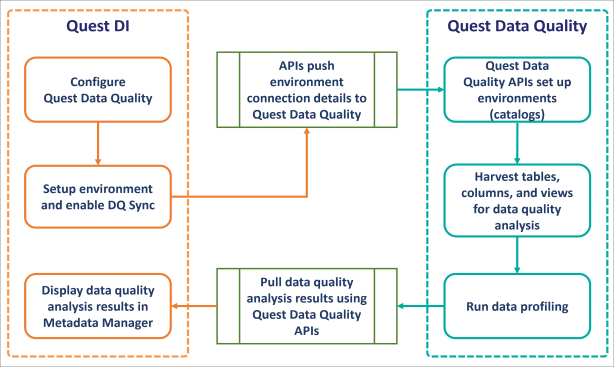
The following sequence gives a high-level understanding of how Quest DI and Quest Data Quality integration works to get data quality analysis:
- Create an environment and switch the Enable DQ Sync option on.
- Scan metadata from data sources.
- Quest Data Quality APIs push the environment connection details from Quest DI to Quest Data Quality.
- Select a catalog in Quest Data Quality. The environments in Quest DI are created as catalogs in Quest Data Quality.
- Add datasets and views to the catalogs in Quest Data Quality for data profiling.
- Run data profiling on datasets and views to derive data quality analysis.
- Run a data sync job in Quest DI to pull data quality analysis results of an environment from Quest Data Quality and view them on Quest DI.
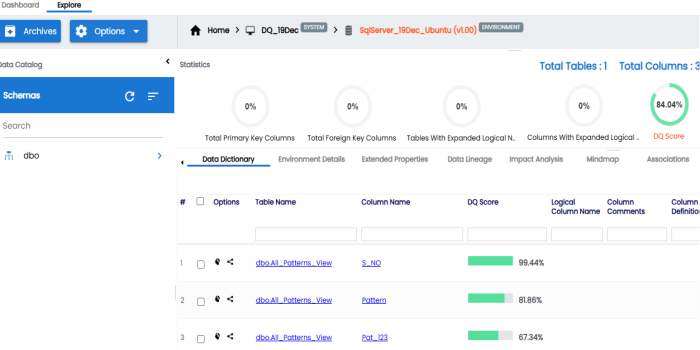
To view data quality analysis, in the Metadata Manager, expand a system node and select an environment. The environment's data quality analysis is displayed on the Data Dictionary tab. For example, the image displays DQ Score for the tables in the selected environment. You can click on it to drill down and view column level data quality analysis.
In the Quest Data Quality application, you can: