To access the Requirements Manager, go to Application Menu > Data Catalog > Requirements Manager.
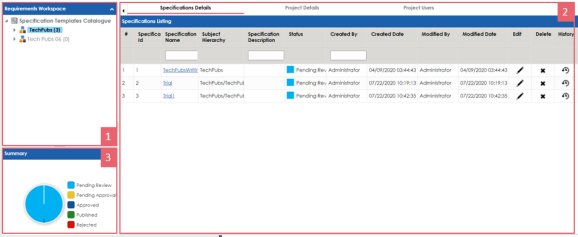
The Requirements Manager dashboard appears:
|
UI Section |
Function |
|---|---|
|
1-Requirements Workspace |
Use this pane to browse through projects and specifications. It enables you to categorize and create specifications under projects. |
|
2-Right Pane |
Use this pane to view or work on the data based on your selection in the Requirements Workspace. |
|
3-Summary |
Use this pane to view a summary of projects. |
Managing requirements involves the following:
- Creating and managing projects
- Creating and managing specifications
- Linking the requirements to mappings
|
Copyright © 2023 Quest Software Inc. |