A dashboard is a collection of charts and reports. Dashboards are grouped under categories.
To create a dashboard, follow these steps:
- In the Reporting Workspace pane, expand a category, and right-click the Dashboards node.
- Click New Dashboard.
- Enter Dashboard Name and Description.
- Dashboard Name: Work-flows
- Description: The dashboard is a collection of reports related to work flows.
- Click
 .
.
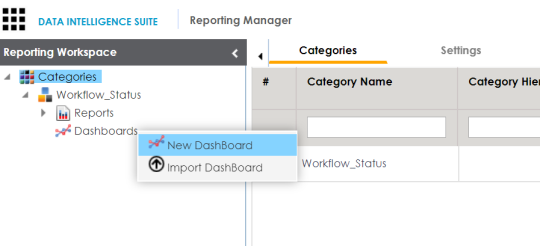
The New Dashboard page appears.
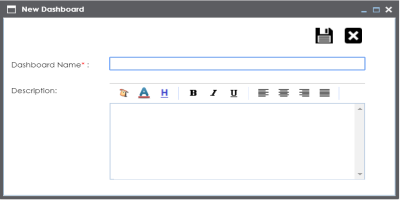
For example:
A new dashboard is created and saved in the dashboard tree.
Once a dashboard is created, you can add components to the dashboard and manage dashboards.
|
|
|
Copyright © 2021 erwin, Inc. All rights reserved. Copyright © 2021 Quest Software Inc. All rights reserved. All trademarks, trade names, service marks, and logos referenced herein belong to their respective companies. |