To get you started with erwin Data Intelligence Suite (DI Suite), this topic gives you an overview of erwin DI Suite architecture and its modules. The following diagram shows a high-level architecture and data flow.
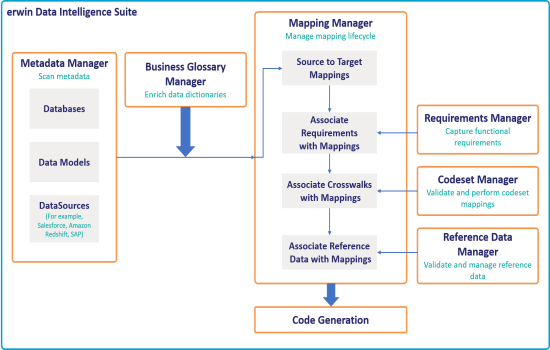
The following sequence gives a high-level understanding of how the modules interact in a typical data integration project:
- Scan metadata from data sources.
- Create business assets and associate them with technical assets.
- Create source data to target data maps, and track data flow and transformations.
- Capture functional requirements.
- Associate requirements with mappings.
- Define codesets and perform code crosswalks (mappings).
- Associate code crosswalks with mappings.
- Validate and manage reference data.
- Associate reference data with Mappings.
- Generate code for:
- ETL jobs
- SQL scripts
- Python code
- Spark code
- DDL scripts
- Stored procedures
erwin DI Suite consists of 11 modules that are categorized as core and add-on modules.
- Core modules perform the major functions of erwin DI Suite offering.
- Add-on modules offer additional functions on top of the core functions.
The availability of add-on modules is subject to licensing.
The following table gives an overview of modules and their functions.
|
Module |
Type |
Function |
|---|---|---|
|
Resource Manager |
Core |
Use the Resource Manager to add application users and create roles for them here. You can also manage access-level permissions. |
|
Metadata Manager |
Core |
Use the Metadata Manager to harvest source or target metadata from a data source. You can run impact and lineage analysis to have better control on a data integration project. |
|
Mapping Manager |
Core |
Use the Mapping Manager to perform source to target mappings. You can also link code mapping objects, reference data objects, and requirements to the mappings. |
|
Codeset Manager |
Add-On |
Use the Codeset Manager to manage your enterprise and legacy codesets. You can perform code mappings (crosswalks) and manage them. |
|
Reference Data Manager |
Add-On |
Use the Reference Data Manager to manage your reference data (tables). You can run validation rules on the reference data and perform data quality checks. Further, you can associate codesets with the reference data. |
|
Business Glossary Manager |
Add-On |
Use the Business Glossary Manager to create, manage, and collaborate on common business vocabulary across the organization. You can also view lineage maps to understand how semantic definitions are related to physical data dictionaries, data mappings, and data lineages. |
|
Requirements Manager |
Add-On |
Use the Requirements Manager to standardize functional requirements documentation. Further, you can link requirements with data mappings. |
|
Test Manager |
Add-On |
Use the Test Manager to manage test specifications created under Metadata Manager and Mapping Manager. |
|
Release Manager |
Add-On |
Use the Release Manager to release data mappings, database objects, and release notes to standardize the release process. |
|
Reports Manager |
Add-On |
Use the Reports Manager to create statistical reports and evaluate your team's productivity. |
|
Workflow Manager |
Add-On |
Use the Workflow Manager to manage Business Glossary Manager, Metadata Manager, and Mapping Manager workflows. You can also create custom workflows and monitor their execution. |
For more information on erwin DI Suite's user interface, refer to the User Interface topic.
|
|
|
Copyright © 2021 erwin, Inc. All rights reserved. Copyright © 2021 Quest Software Inc. All rights reserved. All trademarks, trade names, service marks, and logos referenced herein belong to their respective companies. |