To get you started with using erwin DI Business User Portal (BUP), this topic walks you through the erwin DI BUP UI, its components, and their functions.
Once you have installed erwin DI BUP, follow these steps to access and use it:
- Open erwin DI BUP.
- Enter your credentials to log on to erwin DI BUP.
- Click Login.
The Login page appears.
After successful log in, the Home page appears.
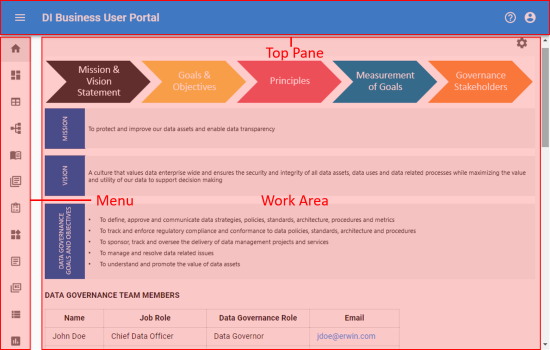
|
UI Section |
Icon |
Function |
|---|---|---|
|
Top Pane |

|
Application Menu: Click this icon to expand the menu and access modules. |

|
Click this icon to use the following options:
|
|

|
Click this icon to use the following options:
|
|
|
Menu |
Use this pane to access modules. |
|
|
Work Area |
Based on your selection on the menu, use this area to view or work on the data. |
|
Copyright © 2020 erwin, Inc.
All rights reserved.
|
|